Watch ClickHouse. Kill the runaway. From your phone.
A native iOS client for ClickHouse monitoring & on-call.
ProbeDeck is a secure mobile client for ClickHouse operators. Watch cluster health, kill runaway queries, and check replica lag over TLS or through your SSH bastion, with a safety check on every command. Your credentials never leave your device.
Gratis download · Eenmalige Pro-ontgrendeling $19.99 · geen abonnement
- FreeMonitoring
- $19.99Pro unlock, once
- 0Backend servers
- Face IDApp lock
- 1 tapDiagnostics opt-out
One minute, no signup
Triage a ClickHouse alert from your phone
One incident, start to finish: cluster health on iPad, running queries sorted by elapsed time, then the memory and bytes read of the query hurting the cluster. Killing that query is the only step that costs money, and it needs the one-time Pro unlock.
Kill the runaway query from bed
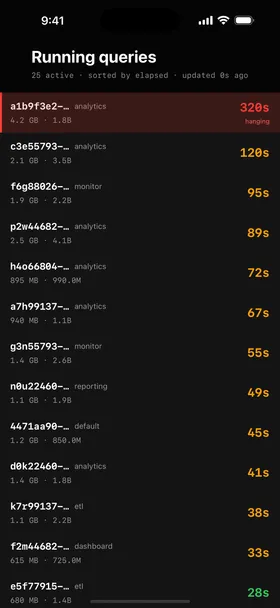
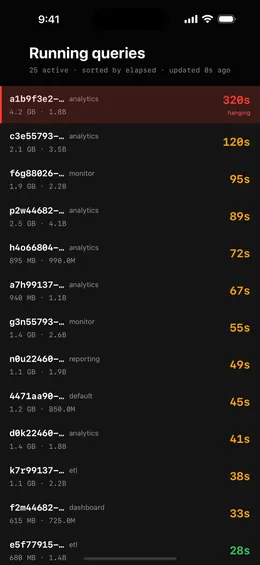
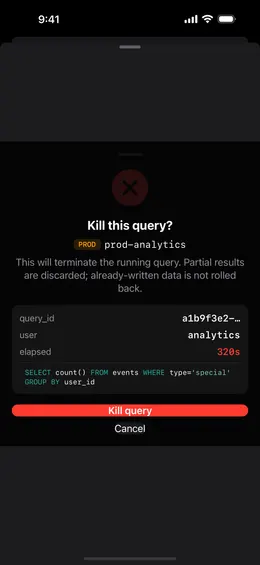
An alert fires at 2 a.m. Open ProbeDeck, watch system.processes update in real time, find the SELECT that is crushing the cluster, and kill it without reaching for a laptop. KILL is a one-time Pro unlock, so the button is visible for free and never a surprise mid-incident.
A safety check on every command
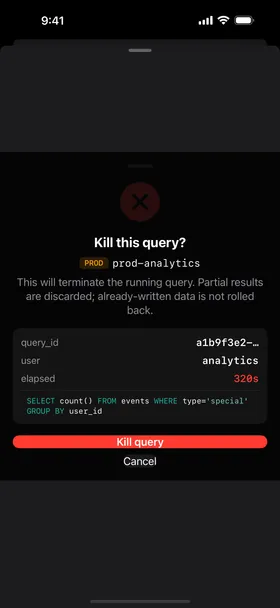
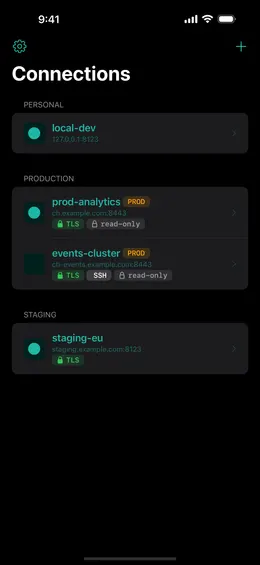
ProbeDeck flags production connections by hostname and tag. Destructive operations (KILL, writes, DDL, OPTIMIZE FINAL) require a type-to-confirm step and show exactly what they touch. Monitoring and read SQL stay one tap away; there is no fake "Undo".
Everything you need to run ClickHouse on call
Built for the SRE or data engineer woken at 2 a.m. who needs to check the cluster and put out the fire from a phone.
Monitoring dashboard · Free
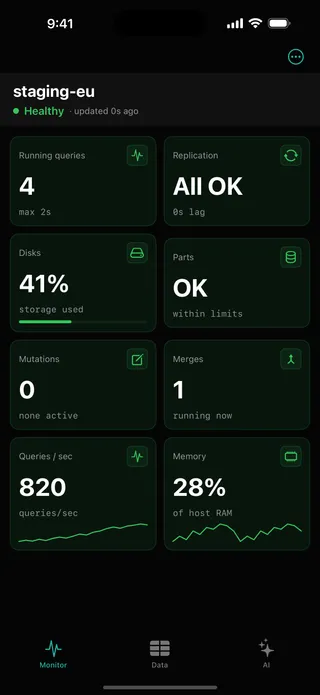
Health tiles for the whole cluster: running queries, replication, disks, parts, merges, QPS, and memory, each graded healthy / warning / critical. Datadog for ClickHouse, in your pocket.
Running queries + Kill · Pro
Read system.processes live and kill a stuck query with a type-to-confirm step. This is the one moment you need a phone: the SELECT that is taking prod down at 2 a.m.
Replication health
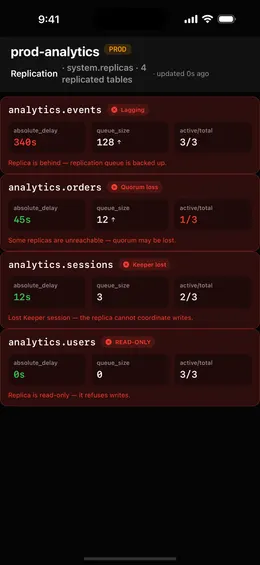
Replica lag from system.replicas, growing replication_queue, and read-only detection when Keeper is unreachable. Triage lag from the alert, before your users feel it.
Parts & merges
Spot the "too many parts" signal and merge pressure across tables. OPTIMIZE FINAL is available, gated behind a hard confirm, because it is expensive.
SQL + data browser
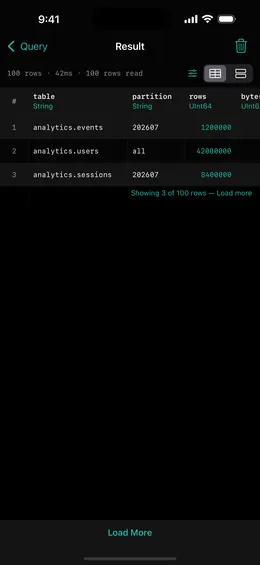
Read SQL and browse data (SELECT / SHOW / DESCRIBE) for free, with a bounded fetch so a query never floods your phone. Writes, DDL, and maintenance SQL are Pro.
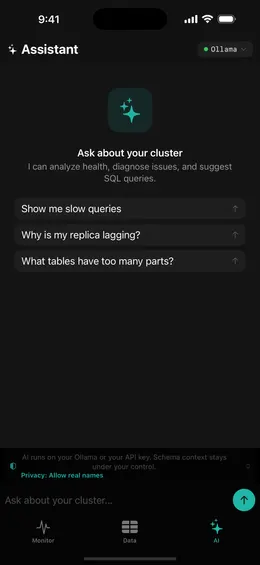
AI assistant · Pro
Ask "why is my replica lagging?" and get a plain-language answer, or turn a question into SQL. Runs on your own Ollama or your API key (BYOK); nothing goes to us.
See it in action
Built for the iPhone in SwiftUI, with no web views anywhere.
Try it with no server
See every screen before you type a password
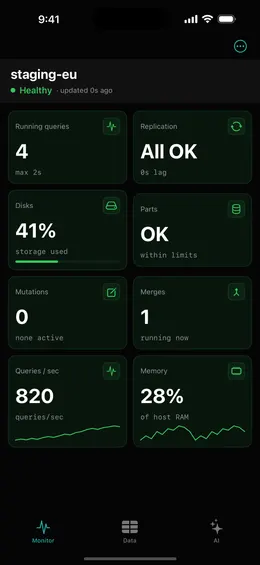
Open ProbeDeck and tap Explore demo data on the empty connection list. The whole app runs on bundled sample data: the health dashboard, running queries, replicas, parts and merges, mutations, the schema browser and SQL results. Demo mode opens no network connection and stores nothing. Connect a real cluster when you are ready, and your credentials go to the iOS Keychain on your device.
- Runs on bundled sample data
- Opens no connection, stores nothing
Built for engineers on call
ProbeDeck is a monitoring and on-call client that understands ClickHouse, built for the person holding the pager, with credentials that never leave the device.
Trust-first: credentials never leave your device
Hosts, passwords, TLS material, and SSH keys stay in the iOS Keychain and Secure Enclave. There is no ProbeDeck account and no cloud sync. You can prove on your own prod that nothing leaves the phone before you ever pay.
You see what we collect before you use the app
You get two toggles on the second screen of first launch: crash reports and anonymous usage counts. Both start on, and we say so right there. Neither carries passwords, hostnames, keys, or values. Switch either off on that screen, or later in Settings.
ClickHouse-native depth, down to the system tables
ProbeDeck reads system.processes, system.replicas, system.replication_queue, system.parts, and system.mutations. It understands parts and merges, ReplicatedMergeTree with Keeper, and stuck mutations as first-class on-call surfaces.
Built for the 2 a.m. incident
Path monitoring, timeouts, and auto-reconnect are tuned for a cellular network during an incident. Health tiles are green when things are fine, so the app stays calm to open at 2 a.m.
Reach prod through your bastion
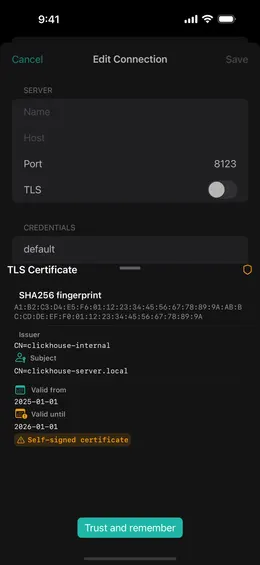
Connect to ClickHouse behind a firewall over an SSH tunnel (password or key) with host-key verification, or directly over HTTPS/TLS. Nothing is proxied or relayed through us.
Honest freemium: Free to see, Pro to operate
All monitoring and read SQL are free, forever. A single one-time Pro unlock ($19.99) adds the operations: kill, writes, the AI assistant, and more than one saved connection. No subscription and no trial wall.
Safety on every command
Production connections are badged. KILL, writes, DDL, and OPTIMIZE FINAL require a type-to-confirm step and show what they touch. ProbeDeck never promises an Undo it cannot deliver: KILL MUTATION does not roll back applied changes.
Frequently asked questions
Yes. ProbeDeck connects to any ClickHouse over its HTTP (8123) or HTTPS/TLS (8443) interface: ClickHouse Cloud with its API credentials, a self-hosted instance, or an on-prem cluster reached through an SSH bastion. If ClickHouse answers over HTTP or HTTPS, ProbeDeck can reach it.
No. ProbeDeck has no backend and no account. Connection details live in the iOS Keychain and SSH keys in the Secure Enclave, and the app connects straight from your phone to the server (or SSH bastion) you configure. Nothing is proxied or mirrored through us. The only optional outbound data is anonymous, scrubbed crash and usage diagnostics, which you can switch off.
Monitoring and read SQL are free forever: the dashboard, running queries, replication, parts and merges, metrics, read-only SELECT / SHOW / DESCRIBE, and browsing data. A one-time Pro unlock ($19.99) adds the operations: KILL QUERY / KILL MUTATION, write and DDL SQL, OPTIMIZE, the AI assistant, and more than one saved connection. No subscription.
Only on infrastructure you control. The AI assistant runs against your own Ollama endpoint or your own API key (BYOK); requests go directly from your phone to that provider, never to us. To answer a question it may include query text or the output of system-table queries you run; it never includes your stored passwords or credentials, and it never runs a destructive command on its own.
Those are excellent desktop database IDEs. ProbeDeck is a native iPhone monitoring and on-call client for ClickHouse, built to watch cluster health and kill a runaway query from a phone during an incident, with production safety and Keychain-only credentials. It is the tool for the moments you do not have a desktop IDE.
Yes. ProbeDeck opens an SSH tunnel directly from your iPhone to reach ClickHouse behind a firewall or private network. Authenticate with a password or an Ed25519/RSA key, verify the host fingerprint, and connect, with no VPN app and no extra infrastructure. SSH is available on the free tier.
ProbeDeck talks to ClickHouse over the HTTP interface and reads standard system tables, so it works with current ClickHouse releases across Cloud and self-hosted deployments. It does not require any special modules or extensions.
Still have questions? Contact support. We respond within 24 hours.
Ready to watch your cluster from your iPhone or iPad?
Free monitoring. Pay once for operations, $19.99, and keep every update after that. No subscription, no cloud account.
Gratis download · Eenmalige Pro-ontgrendeling $19.99 · geen abonnement

Reading this on a desktop?
Scan the code to open ProbeDeck on your iPhone or iPad.