Your inserts are failing with Code: 242. DB::Exception: Table is in readonly mode, reads still work, and nothing in the last deploy touched that table. Search for the message and you get a stack of GitHub issues that end in a server restart.
The restart usually works. It also destroys the evidence, so the same thing happens again next month at the same hour. Four queries tell you which flavour of the problem you have, and all four are plain reads.
What read-only mode means
A ReplicatedMergeTree table keeps its metadata in ClickHouse Keeper (or ZooKeeper). Every write has to be recorded there before it counts, so a replica that cannot reach Keeper has one safe option: refuse writes and keep serving reads. That is read-only mode.
The ClickHouse documentation ties the two columns you are about to read together and leaves no room for doubt: is_session_expired is “basically the same as is_readonly”. A table sitting in read-only mode means the session with Keeper is gone, give or take the two cases below.
Rule those two out early. A server config with no Keeper section puts every replicated table into read-only mode from startup, and no amount of restarting will move it. Someone deleting the metadata under zookeeper_path produces the same flag and needs a different command. Both show up in the queries below.
1. Which tables, and since when
SELECT
    database,
    table,
    is_readonly,
    is_session_expired,
    readonly_start_time,
    absolute_delay,
    queue_size,
    active_replicas,
    total_replicas,
    zookeeper_exception
FROM system.replicas
WHERE is_readonly OR is_session_expired
ORDER BY readonly_start_time ASC;
The result takes one of three shapes.
Every replicated table on the node is read-only. The node lost Keeper. Nothing is wrong with any individual table, and no per-table command will help until the connection is back.
One table is read-only and the rest are fine. The session is alive, so this is table-level: its metadata path is missing or damaged. Read zookeeper_exception before doing anything else.
Nothing comes back, but writes still fail. The failure is not replication. Check disk space and the user profile before you go further down this page.
Read readonly_start_time before you touch anything. It stays null while the replica is healthy and takes a timestamp the moment the replica flips. That timestamp separates two situations that need opposite responses: a fault that started ninety seconds ago while somebody restarts Keeper, and a table that has been refusing writes since Tuesday with nobody watching. Recent versions add readonly_duration in seconds and save you the arithmetic.
zookeeper_exception carries the last error from talking to Keeper. Read it in full. Session expired and Connection loss point at the session. No node under a table path is the metadata case from section 6.
2. Is the session alive right now?
system.replicas tells you the state of the tables. It does not tell you whether the connection recovered thirty seconds ago. This does:
SELECT
    name,
    host,
    port,
    index,
    is_expired,
    connected_time,
    session_uptime_elapsed_seconds,
    session_timeout_ms,
    client_id
FROM system.zookeeper_connection;
is_expired answers the immediate question. Spend your attention on session_uptime_elapsed_seconds.
Compare it against how long the server has been up. A session uptime of four hours on a node that has run for four hours is a connection that has never dropped. A session uptime of eleven seconds on a node that has run for nine days is a session being recreated over and over, and you have caught it between drops. That is the flapping case, and it never reproduces while you watch it, which is why the counters in the next section matter.
host and index tell you which Keeper node this server picked. When one Keeper node is sick and the others are fine, the replicas that landed on the sick one go read-only while their neighbours stay healthy, and the cluster looks half broken for no obvious reason.
session_timeout_ms is the negotiated timeout, not the one you asked for. ClickHouse requests 30 seconds by default through session_timeout_ms in its config, and the Keeper or ZooKeeper server clamps that request to its own minimum and maximum. If the negotiated value is far below what you configured, the server side is overriding you, and no amount of editing the ClickHouse config will change it.
3. How often has this happened?
A session that flaps leaves a trail even after it reconnects.
SELECT
    name,
    code,
    value,
    last_error_time,
    last_error_message
FROM system.errors
WHERE name IN (
    'KEEPER_EXCEPTION',
    'NO_ZOOKEEPER',
    'TABLE_IS_READ_ONLY',
    'NO_ACTIVE_REPLICAS',
    'ALL_CONNECTION_TRIES_FAILED'
)
ORDER BY value DESC;
value counts occurrences since the server started, and last_error_time says when it last happened. Ten KEEPER_EXCEPTION errors with a timestamp from four minutes ago is a live problem. Ten from three weeks ago is history.
The profile events split the causes further:
SELECT
    event,
    value
FROM system.events
WHERE event IN (
    'ZooKeeperInit',
    'ZooKeeperHardwareExceptions',
    'ZooKeeperUserExceptions',
    'ZooKeeperOtherExceptions',
    'ZooKeeperTransactions'
);
ZooKeeperInit counts session initialisations. One per server start is normal. A number in the hundreds on a node that started last week is your flapping session, counted.
ZooKeeperHardwareExceptions covers connection losses, timeouts and expiries: the network layer and the session. ZooKeeperUserExceptions covers logically expected results such as a node that already exists, and a high count there is routine rather than alarming. Reading the two separately stops you from chasing a number that was never a fault.
For the live picture, system.metrics holds ZooKeeperSession (sessions open at this moment), ZooKeeperWatch and ZooKeeperRequest (requests in flight). A watch count in the millions is a Keeper under real load, and an overloaded Keeper is the usual reason sessions start expiring on a cluster that used to be stable.
4. One replica or the whole cluster?
active_replicas counts only the replicas that currently hold a session in Keeper. That makes the comparison with total_replicas a Keeper health check that costs nothing:
SELECT
    database,
    table,
    total_replicas,
    active_replicas,
    replica_is_active
FROM system.replicas
WHERE active_replicas < total_replicas;
Three replicas of which one is active means two of your hosts cannot see Keeper, and the survivor may be about to lose quorum on writes. Three of three active while one table is read-only means the sessions are fine and the fault sits in that table’s metadata.
replica_is_active is a map from replica name to a flag, so it names the hosts that dropped out instead of making you go host by host.
Keep the two failures apart in your head. A lagging replica holds a live session and drains its queue too slowly, and that has its own set of causes. A read-only replica holds no session, so nothing pulls its queue at all. The dashboards look similar. The repairs have nothing in common.
5. Why the session dropped
Sections 1 through 4 give you four numbers: when the replica flipped, how long the current session has lived, how many times it has reconnected, and how many replicas hold a session right now. Four causes account for most of what you will see, and those numbers tell them apart.
Keeper is overloaded. Watches and znodes accumulate, the disk under Keeper is slow to fsync, and request latency climbs until clients time out. The signature is several ClickHouse hosts losing sessions inside the same minute, a high ZooKeeperWatch, and ZooKeeperInit climbing on all of them together. Adding timeout on the client does not fix a Keeper that cannot answer in time.
ClickHouse itself stalled. The session expires when the client fails to heartbeat for longer than the negotiated timeout, and a server deep in swap, pinned on IO, or paused under memory pressure stops heartbeating without crashing. The signature is one host with a broken session while every other replica stays active, and active_replicas down by exactly one.
The network between them. Packet loss, a DNS record that moved, a Keeper node that came back on a different address. ZooKeeperHardwareExceptions climbs, host in system.zookeeper_connection differs from the node you expect, and the failures cluster on the hosts sharing a rack or a subnet.
Keeper lost quorum. With no leader elected, nobody gets a session, every replicated table on every host goes read-only at the same second, and active_replicas collapses toward zero across the cluster. Nothing on the ClickHouse side repairs this. Fix the Keeper ensemble first.
One more possibility sits underneath all four: a negotiated timeout much shorter than you intended. Section 2 reads it straight out of session_timeout_ms, so check that column before you spend an hour on the network.
6. Recovery, in order
Fix Keeper first. Every command below assumes the session can be re-established. Running them against a Keeper that is still down accomplishes nothing and adds noise to the log.
Once system.zookeeper_connection shows a session that stays up:
SYSTEM RESTART REPLICA db.table;This re-initialises the replica: it re-reads its state from Keeper, compares that against what is on disk, and queues whatever work is missing. The table is briefly unavailable while it runs. In the common case, this is the whole repair, and the read-only flag clears within seconds.
If the queue looks stalled afterwards rather than read-only, SYSTEM SYNC REPLICA db.table waits for the replica to catch up with the log and will block until it does.
SYSTEM RESTORE REPLICA is a different tool for a much rarer case, and the distinction matters because reaching for it early does real damage:
SYSTEM RESTORE REPLICA db.table;It exists for when the metadata in Keeper is gone while the data on disk is intact: the ZooKeeper root was wiped, the replicas path was removed, or one replica path disappeared. ClickHouse refuses to run it on anything except a table that is already read-only, which is the one guard rail standing between you and an unnecessary rebuild. It moves the parts through detached/ and reattaches the committed ones.
If a host is genuinely gone and its replica entry is still in Keeper holding things up, SYSTEM DROP REPLICA 'name' FROM TABLE db.table removes the dead entry. It refuses to drop a local replica, and it does not delete any data from disk.
On a Replicated database engine the same state lives in system.database_replicas, where is_readonly, is_session_expired and zookeeper_exception mean what they mean at table level.
What not to reach for first
Restarting the server. It re-establishes the session, so the symptom disappears, and it clears every counter in section 3 along with it. You lose the answer to why the session dropped, which is the thing that decides whether this recurs.
SYSTEM RESTORE REPLICA because the name sounds right. It is for lost metadata. On a table whose only problem is an expired session, you have replaced a thirty-second fix with a detach and reattach of every part.
Raising session_timeout_ms as the first move. A longer timeout does help a link with real latency, and on a WAN hop it is the right answer. It also hides an overloaded Keeper by giving it more room to be slow, and what comes back three weeks later is bigger. Read ZooKeeperInit and the watch count first, then decide.
Treating it as replica lag. The two produce different columns and need different repairs. absolute_delay climbing with an active session is lag. is_readonly = 1 is an absent session. The full column reference lays out which table answers which question.
Doing this from a phone
Every query on this page reads a system table and writes nothing, which is what makes them usable at 2 a.m. before you have found a laptop.
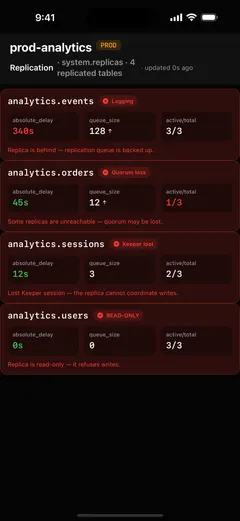
That is the case ProbeDeck is built for. The replication screen reads system.replicas and flags read-only tables, expired Keeper sessions and quorum loss as separate states rather than folding them into one red dot, because they need different responses. Tap a table and you get zookeeper_exception in full, the log pointer against the log maximum, and the replication queue with its last exception, which covers sections 1 through 4 of this page without typing SQL on a phone keyboard. All of that reading is free.
The two commands that end this page, SYSTEM SYNC REPLICA and SYSTEM RESTART REPLICA, are writes, so they sit behind a type-to-confirm step with the cluster’s PROD badge in view. You can also open the app and tap Explore demo data to walk through the whole flow against bundled sample data, with no server and no password.
ClickHouse is a registered trademark of ClickHouse, Inc. ProbeDeck is not affiliated with, endorsed by, or sponsored by ClickHouse, Inc.