Monitor your ClickHouse cluster from your iPhone
An alert fires at 2 a.m. and your laptop is across the room. With ProbeDeck you open your iPhone, connect to your ClickHouse cluster over TLS or through your SSH bastion, and within seconds you know whether queries are backing up, a replica is lagging, or a disk is filling. Monitoring is free, so you can run it against your own production before you ever pay.
One minute, no signup
Triage a ClickHouse alert from your phone
One incident, start to finish: cluster health on iPad, running queries sorted by elapsed time, then the memory and bytes read of the query hurting the cluster. Killing that query is the only step that costs money, and it needs the one-time Pro unlock.
Cluster health at a glance
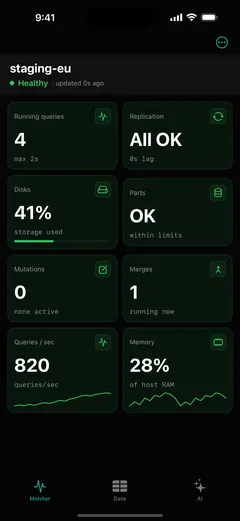
The Monitoring dashboard is the main screen. It surfaces health tiles for the whole cluster: running queries, replication, disks, parts, mutations, merges, QPS and memory. Each tile is graded healthy, warning, or critical, so a single glance tells you whether everything is fine. Pull to refresh, or let it poll while the screen is open.
See what's running, right now
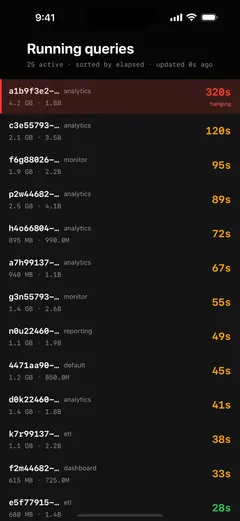
ProbeDeck reads system.processes live: query_id, user, elapsed time with a colour grade, memory, and rows read. During an incident you can see exactly which SELECT is loading the cluster. Killing a runaway query is a one-time Pro unlock. The button stays visible for free with a PRO badge, so you find it while the cluster is calm.
Replica lag and read-only detection
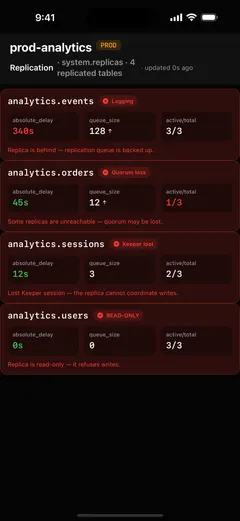
Replication problems are a ClickHouse-specific on-call surface that generic clients miss. ProbeDeck reads system.replicas andsystem.replication_queue to show absolute delay, queue size, and the read-only flag that means Keeper is unreachable. You can triage lag from the alert, before your users feel it.
Secure access over TLS or your SSH bastion
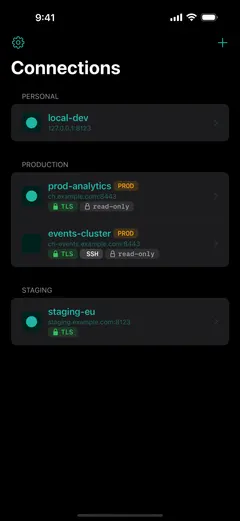
ProbeDeck connects directly from your iPhone to ClickHouse over its HTTPS/TLS interface, or through an SSH tunnel to reach a cluster behind a firewall, with password or key and host-key verification. Nothing is proxied or relayed through us. The app stores connections in the iOS Keychain and never syncs them to any external service, so your credentials stay on the device.
Get ProbeDeck
ProbeDeck is an iOS 17+ app by Vladimir Chemeris. Monitoring is free forever; a one-time Pro unlock ($19.99) adds the operations: kill, writes, and the AI assistant. No subscription.
Free download · One-time Pro unlock $19.99 · no subscription
Learn more on the ClickHouse client for iOS overview, see how to kill a runaway query, or read the guide to mobile ClickHouse monitoring.
Try it with no server
See every screen before you type a password
Open ProbeDeck and tap Explore demo data on the empty connection list. The whole app runs on bundled sample data: the health dashboard, running queries, replicas, parts and merges, mutations, the schema browser and SQL results. Demo mode opens no network connection and stores nothing. Connect a real cluster when you are ready, and your credentials go to the iOS Keychain on your device.
- Runs on bundled sample data
- Opens no connection, stores nothing
ClickHouse is a registered trademark of ClickHouse, Inc. ProbeDeck is not affiliated with, endorsed by, or sponsored by ClickHouse, Inc.