Kill a runaway ClickHouse query from your phone
One heavy query is eating the whole cluster, memory is climbing, and you are nowhere near a laptop. With ProbeDeck you open your iPhone, find the offending query in system.processes, and runKILL QUERY, with a type-to-confirm safety step in the way and a PROD badge reminding you exactly which cluster you are pointed at. It is the minimal action that gets the cluster breathing again.
One minute, no signup
Triage a ClickHouse alert from your phone
One incident, start to finish: cluster health on iPad, running queries sorted by elapsed time, then the memory and bytes read of the query hurting the cluster. Killing that query is the only step that costs money, and it needs the one-time Pro unlock.
Find the runaway in system.processes
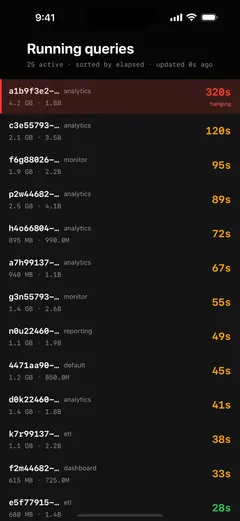
ProbeDeck reads system.processes in real time and lists every active query with its query_id, the user who launched it, elapsed time with a colour grade so the long-runners jump out, memory used, and rows read. During an incident this is where you look first: the query that has been running for minutes and is climbing on memory is usually the one holding the cluster hostage. Tap it to see the full detail before you do anything.
KILL QUERY, with a hard confirm in the way
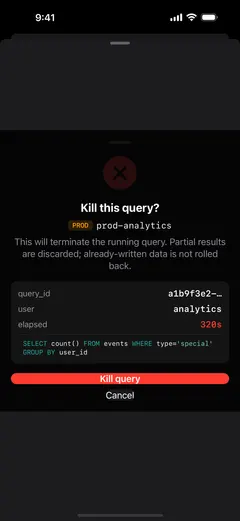
Tapping a query opens a confirm sheet that shows exactly what you are about to stop: the query_id, the user, how long it has been running, and a preview of the SQL, so you can be certain it is the right one. On a production connection the sheet is amplified with a PRODbadge and requires type-to-confirm: you type the confirmation text yourself before ProbeDeck will issueKILL QUERY WHERE query_id='…'. That hard-confirm step exists so you never fat-finger a kill on the wrong cluster at 2 a.m.
The kill button is visible before you pay
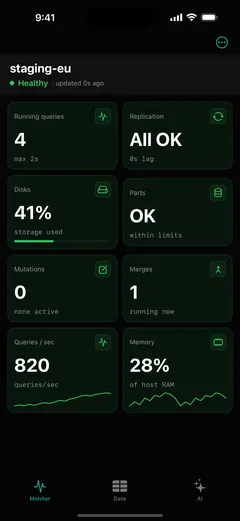
Killing a query is part of the one-time Pro unlock ($19.99, no subscription), but the button is visible for free from day one with a PRObadge. You discover it while things are calm. Monitoring (the dashboard, system.processes, replica lag, disks and parts) stays free forever, so you can watch the cluster and decide the kill is worth $19.99 long before you need it.
Honest about what a kill can and cannot undo
ProbeDeck does not pretend a kill is reversible when it is not.KILL QUERY stops the running query and frees its resources.KILL MUTATION stops a mutation from continuing, but it doesnot roll back the changes it has already applied. AndDROP or TRUNCATE are irreversible: the data is gone. ProbeDeck never shows a fake "Undo" for any of these. It puts the type-to-confirm gate and the amber production badge in front of every destructive operation, so you stop and think before you act.
Get ProbeDeck
ProbeDeck is an iOS 17+ app by Vladimir Chemeris. Monitoring is free forever; a one-time Pro unlock ($19.99) adds the operations: kill, writes, and the AI assistant. No subscription.
Free download · One-time Pro unlock $19.99 · no subscription
See the full ClickHouse monitoring app for iPhone, learn how ProbeDeck handles replica lag on-call, or read the guide to killing a runaway ClickHouse query from mobile.
Try it with no server
See every screen before you type a password
Open ProbeDeck and tap Explore demo data on the empty connection list. The whole app runs on bundled sample data: the health dashboard, running queries, replicas, parts and merges, mutations, the schema browser and SQL results. Demo mode opens no network connection and stores nothing. Connect a real cluster when you are ready, and your credentials go to the iOS Keychain on your device.
- Runs on bundled sample data
- Opens no connection, stores nothing
ClickHouse is a registered trademark of ClickHouse, Inc. ProbeDeck is not affiliated with, endorsed by, or sponsored by ClickHouse, Inc.