See ClickHouse replica lag before your users do
A replica that falls behind serves stale results, and the first person to notice is usually a user reading yesterday's numbers. With ProbeDeck you open your iPhone, connect to your ClickHouse cluster over TLS or through your SSH bastion, and read replication health straight from the system tables. Monitoring is free, so you can triage lag from the alert on your phone before anyone downstream feels it, and prove on your own production that nothing leaves the device before you ever pay.
One minute, no signup
Triage a ClickHouse alert from your phone
One incident, start to finish: cluster health on iPad, running queries sorted by elapsed time, then the memory and bytes read of the query hurting the cluster. Killing that query is the only step that costs money, and it needs the one-time Pro unlock.
Replication health from system.replicas
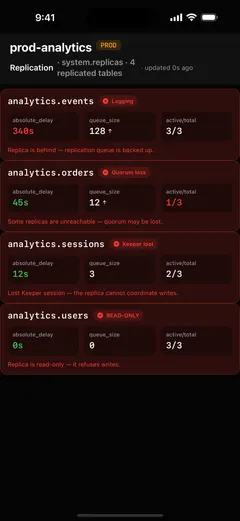
ProbeDeck reads system.replicas andsystem.replication_queue directly. It surfaces the fields that matter during an incident: is_readonly (a red flag, Keeper is unreachable), absolute_delay (how far behind the replica is), queue_size, and num_tries with thelast_exception for entries that keep failing. You skip the wall of raw rows and get the numbers that tell you whether a replica is healthy, slipping, or stuck.
What a growing queue and rising delay mean
A growing replication queue together with a risingabsolute_delay is the signature of a replica falling behind. It is fetching and merging parts slower than they arrive. Withis_readonly=1, the replica has lost its Keeper (ZooKeeper) connection and can no longer accept writes; reads may still succeed but serve increasingly stale data. Both signals side by side on one screen let you tell "temporarily busy" apart from "this node needs attention now."
Triage the alert from your phone
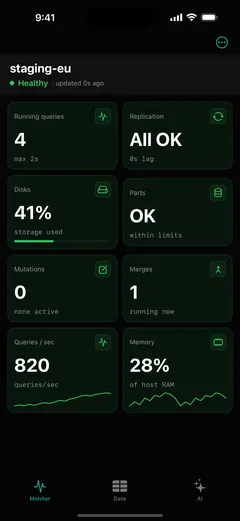
ProbeDeck is monitoring first, and monitoring is free. When a lag alert fires, you do not have to find a laptop and a VPN. You open the app, checkabsolute_delay and the queue on the affected replica, and decide whether it is catching up on its own or needs a hand. You catch a lagging replica before your users feel stale reads, right from the notification on your phone.
Ask the AI assistant why a replica is lagging
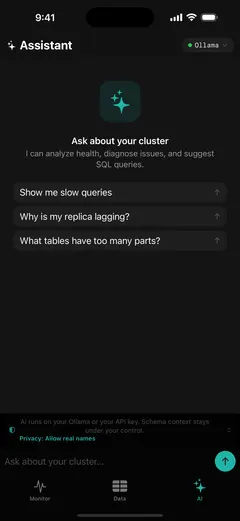
The optional Pro AI assistant can answer "why is my replica lagging?"by reading those same system tables and explaining what it sees: a stuck queue entry, a repeating last_exception, or a node that has gone read-only. It runs on your own Ollama or your API key (BYOK), so the questions and your data go to your model, not to the developer. Nothing is proxied or relayed through us.
Secure access over TLS or your SSH bastion
ProbeDeck connects directly from your iPhone to ClickHouse over its HTTPS/TLS interface, or through an SSH bastion to reach a cluster behind a firewall, with password or key auth and host-key verification. Connections stay in the iOS Keychain and never sync to any external service, so your credentials never leave the device.
Get ProbeDeck
ProbeDeck is an iOS 17+ app by Vladimir Chemeris. Monitoring is free forever; a one-time Pro unlock ($19.99) adds the operations: kill, writes, and the AI assistant. No subscription.
Free download · One-time Pro unlock $19.99 · no subscription
See the full ClickHouse monitoring for iPhone overview, learn how to kill a runaway query, or read why is my ClickHouse replica lagging?
Try it with no server
See every screen before you type a password
Open ProbeDeck and tap Explore demo data on the empty connection list. The whole app runs on bundled sample data: the health dashboard, running queries, replicas, parts and merges, mutations, the schema browser and SQL results. Demo mode opens no network connection and stores nothing. Connect a real cluster when you are ready, and your credentials go to the iOS Keychain on your device.
- Runs on bundled sample data
- Opens no connection, stores nothing
ClickHouse is a registered trademark of ClickHouse, Inc. ProbeDeck is not affiliated with, endorsed by, or sponsored by ClickHouse, Inc.