A native ClickHouse client for iOS
ProbeDeck is a native iOS client for ClickHouse operators. It connects straight from your iPhone to your cluster over TLS or through an SSH bastion, lets you read SQL and browse your schema and data, and shows cluster health at a glance. Your credentials live in the iOS Keychain and the Secure Enclave. There is no account and no backend, so nothing is proxied through the developer. ProbeDeck is a monitoring and on-call client, scoped to that job.
One minute, no signup
Triage a ClickHouse alert from your phone
One incident, start to finish: cluster health on iPad, running queries sorted by elapsed time, then the memory and bytes read of the query hurting the cluster. Killing that query is the only step that costs money, and it needs the one-time Pro unlock.
Connect over TLS or an SSH bastion
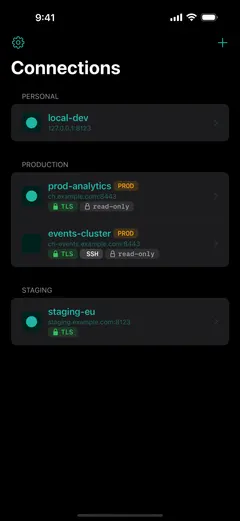
ProbeDeck talks to ClickHouse over its native HTTP interface on8123 or HTTPS/TLS on 8443, authenticating with a ClickHouse user and password. It also accepts ClickHouse Cloud credentials, and for a cluster behind a firewall it can open anSSH tunnel through a bastion host, with password or key and host-key verification so you know you are reaching the right box. The connection is direct: nothing is relayed through us.
Read SQL and browse your data
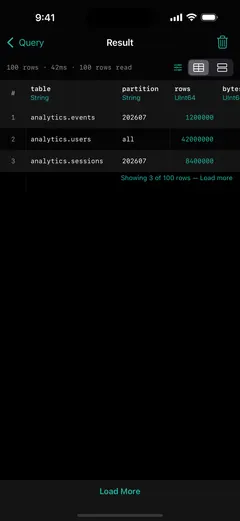
Running read SQL (SELECT, SHOW,DESCRIBE and EXPLAIN) and browsing data arefree. Results come back with a bounded fetch: there is a row cap and a "load more" that pages through the response asJSONEachRow, so a wide or busy query never floods your phone. Writes and DDL are a one-time Pro unlock; the read path stays free forever.
Explore the schema
The schema browser walks the tree the way you think about it: databases, then tables, then columns. You can see the engine behind each table (MergeTree, ReplicatedMergeTree and friends) and the type of every column, so you can orient yourself in an unfamiliar cluster from the phone before you write a single query.
Monitor cluster health
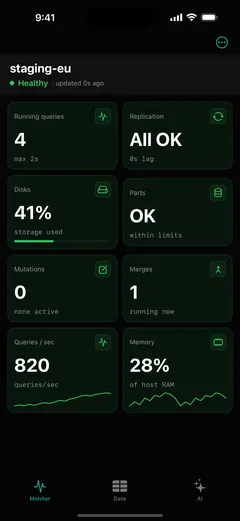
A Monitoring dashboard reads the system tables that matter on call: system.processes for what is running,system.replicas for replication state, andsystem.parts for storage, among others. It grades each surface so a glance tells you whether the cluster is healthy. Monitoring and read SQL are free, so you can run ProbeDeck against your own production before you ever pay.
Credentials stay in the Keychain
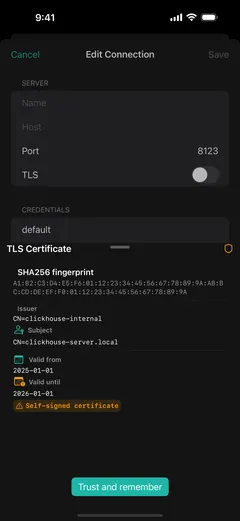
Everything sensitive (host, password, TLS material and SSH keys) is stored in the iOS Keychain, backed by the Secure Enclave. There is no account to create, no backend to sign in to, and nothing is proxied through the developer. Your credentials never leave the device, so you can run ProbeDeck against production without handing your access to anyone.
Get ProbeDeck
ProbeDeck is an iOS 17+ app by Vladimir Chemeris. Monitoring and read SQL are free forever; a one-time Pro unlock ($19.99) adds the operations: kill, writes, and the AI assistant. No subscription, and no account.
Free download · One-time Pro unlock $19.99 · no subscription
See how to monitor a ClickHouse cluster from your iPhone, set up an SSH tunnel to ClickHouse on iOS, or read the guide to mobile ClickHouse monitoring.
Try it with no server
See every screen before you type a password
Open ProbeDeck and tap Explore demo data on the empty connection list. The whole app runs on bundled sample data: the health dashboard, running queries, replicas, parts and merges, mutations, the schema browser and SQL results. Demo mode opens no network connection and stores nothing. Connect a real cluster when you are ready, and your credentials go to the iOS Keychain on your device.
- Runs on bundled sample data
- Opens no connection, stores nothing
ClickHouse is a registered trademark of ClickHouse, Inc. ProbeDeck is not affiliated with, endorsed by, or sponsored by ClickHouse, Inc.