Reach prod ClickHouse through your bastion
Your production ClickHouse doesn't sit on the public internet. It lives inside a private network, and the only way in is a jump host. ProbeDeck opens a TCP tunnel over SSH straight from your iPhone to that bastion and forwards to the cluster's HTTP or HTTPS port, so you can watch health and running queries from anywhere. There is no VPN app to install and no relay in the path. Because monitoring is free, you can prove it works on your own bastion before you ever pay.
One minute, no signup
Triage a ClickHouse alert from your phone
One incident, start to finish: cluster health on iPad, running queries sorted by elapsed time, then the memory and bytes read of the query hurting the cluster. Killing that query is the only step that costs money, and it needs the one-time Pro unlock.
An SSH tunnel opened from the phone
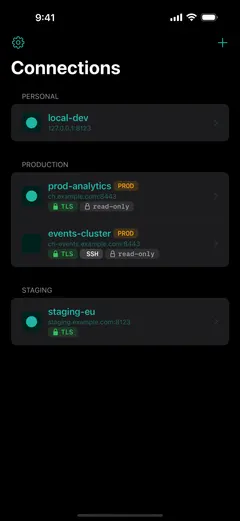
ProbeDeck reaches a cluster behind a VPN or private network by opening an SSH tunnel directly from the device to your jump host, then forwarding the connection to ClickHouse's HTTP interface on 8123 or the TLS interface on 8443. There is no VPN app to install and no side service to run. You enter the bastion address, the ClickHouse host and port it can reach, and ProbeDeck does the port forwarding itself. From there the monitoring dashboard, running queries, and replica lag all load as they would on a direct connection.
Key or password auth, with a verified fingerprint
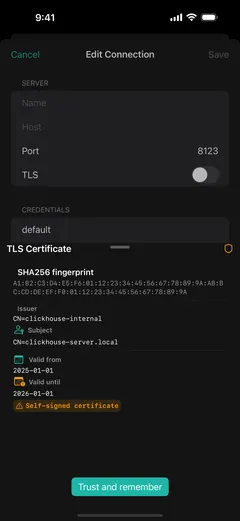
Authenticate to the bastion with a password or an Ed25519 or RSA private key, whichever your jump host expects. Before it opens the tunnel, ProbeDeck shows the server's host key fingerprint and verifies it, so it catches a swapped or spoofed host instead of silently trusting it. Private keys are held in the device's Secure Enclave; passwords and other connection credentials live in the iOS Keychain. Nothing about the connection syncs to an external service.
SSH is on the free tier on purpose
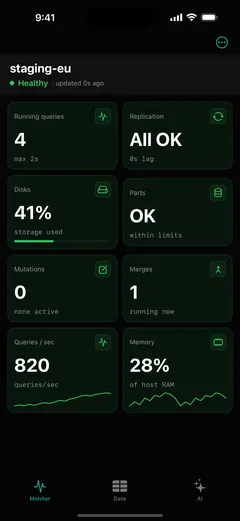
The people who need this are the ones sitting behind a bastion, and a locked-away tunnel would stop them before they could try read-only monitoring. SSH sits in the free tier. You can wire ProbeDeck to your production jump host, watch system.metrics and system.processes, and decide on your own infrastructure whether the app earns a place on your on-call phone, without spending anything first.
Your device, your bastion, your server
The tunnel runs from your iPhone to your bastion to your ClickHouse server. Nothing is proxied or relayed through the developer at any point. There is no middleman host in the path and no copy of your traffic anywhere but your own network. It rides over an ordinary SSH connection, so it works over cellular too, and you can reach prod during an incident from wherever you happen to be.
Get ProbeDeck
ProbeDeck is an iOS 17+ app by Vladimir Chemeris. Monitoring, including SSH-tunnel access through your bastion, is free forever; a one-time Pro unlock ($19.99) adds the write operations and the AI assistant. No subscription.
Free download · One-time Pro unlock $19.99 · no subscription
See the full ClickHouse monitoring app for iPhone, learn about the ClickHouse Cloud client for iOS, or read the guide to ClickHouse over an SSH tunnel on iOS.
Try it with no server
See every screen before you type a password
Open ProbeDeck and tap Explore demo data on the empty connection list. The whole app runs on bundled sample data: the health dashboard, running queries, replicas, parts and merges, mutations, the schema browser and SQL results. Demo mode opens no network connection and stores nothing. Connect a real cluster when you are ready, and your credentials go to the iOS Keychain on your device.
- Runs on bundled sample data
- Opens no connection, stores nothing
ClickHouse is a registered trademark of ClickHouse, Inc. ProbeDeck is not affiliated with, endorsed by, or sponsored by ClickHouse, Inc.