ClickHouse Cloud on your iPhone
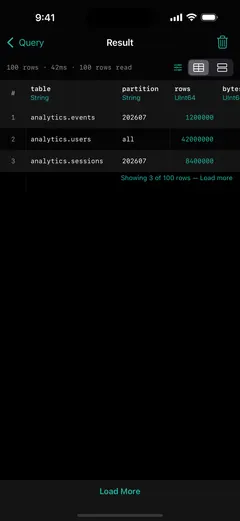
You run a managed ClickHouse Cloud service, and the page you want on your phone is the one that tells you it's healthy. ProbeDeck connects straight to your Cloud endpoint over TLS with your service credentials, shows the same monitoring you'd get on self-hosted, and lets you run read SQL from the couch. Monitoring is free, so you can point it at your own Cloud service and confirm nothing leaves the phone before you ever pay.
One minute, no signup
Triage a ClickHouse alert from your phone
One incident, start to finish: cluster health on iPad, running queries sorted by elapsed time, then the memory and bytes read of the query hurting the cluster. Killing that query is the only step that costs money, and it needs the one-time Pro unlock.
Connect to your Cloud service over TLS
ClickHouse Cloud gives every service a public HTTPS endpoint on port8443. ProbeDeck talks to it directly over TLS using the Cloud service credentials you already have: the username and password from your service's connection details. A managed Cloud endpoint is reachable on the public internet, so there is no bastion to stand up and no SSH tunnel to configure. You paste the host, keep the default HTTPS port, add your credentials, and you're connected.
The same monitoring as self-hosted, free
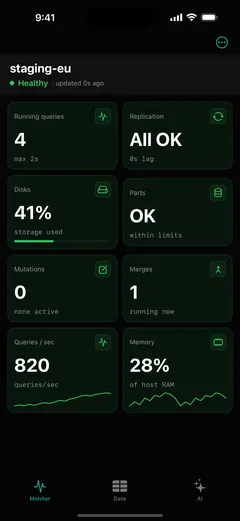
A managed service can still go dark on you. ProbeDeck reads the same system tables Cloud exposes, so you get the full dashboard: health tiles, running queries from system.processes, replica health, parts and merges, and cluster metrics, each graded healthy, warning, or critical. You get the same monitoring you'd get pointing ProbeDeck at a self-hosted node, and all of it is free.
Kill a runaway query on a managed service
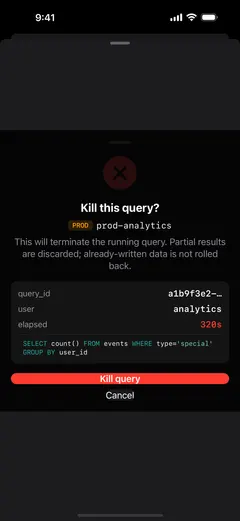
ClickHouse Cloud runs the infrastructure, and a runaway query on your service is still yours to stop. ProbeDeck lets you watch the health of the managed instance and, when one SELECT is dragging everything down, kill it from your phone. Killing a query is a one-time Pro unlock; the button is visible for free with a PRO badge, so it's never a surprise mid-incident.
Your credentials stay on the phone
Your Cloud service credentials live in the iOS Keychain and nowhere else. There is no ProbeDeck account to create and no backend, and nothing is proxied or relayed through the developer. The phone connects to your Cloud endpoint and back. Your credentials never leave the device, and you can verify that on your own service before paying a cent.
One app for every cluster
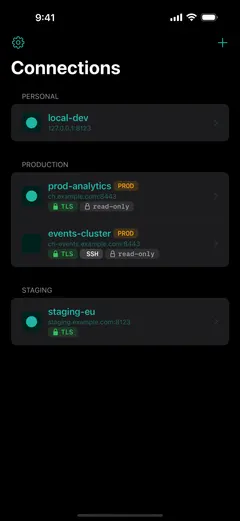
Most teams run more than Cloud. ProbeDeck also connects to self-hosted and on-prem ClickHouse, over TLS directly or through anSSH bastion when a cluster sits behind a firewall, so a single app covers your managed services and your own boxes side by side. Keeping more than one saved connection is a Pro feature; the first connection, and all the monitoring on it, stays free.
Get ProbeDeck
ProbeDeck is an iOS 17+ app by Vladimir Chemeris. Monitoring is free forever; a one-time Pro unlock ($19.99) adds the operations: kill, writes, extra saved connections, and the AI assistant. No subscription.
Free download · One-time Pro unlock $19.99 · no subscription
See the full ClickHouse monitoring for iPhone feature set, read about the ClickHouse client for iOS, or follow the guide to monitoring ClickHouse from your iPhone.
Try it with no server
See every screen before you type a password
Open ProbeDeck and tap Explore demo data on the empty connection list. The whole app runs on bundled sample data: the health dashboard, running queries, replicas, parts and merges, mutations, the schema browser and SQL results. Demo mode opens no network connection and stores nothing. Connect a real cluster when you are ready, and your credentials go to the iOS Keychain on your device.
- Runs on bundled sample data
- Opens no connection, stores nothing
ClickHouse is a registered trademark of ClickHouse, Inc. ProbeDeck is not affiliated with, endorsed by, or sponsored by ClickHouse, Inc.