Almost no production ClickHouse cluster answers on the public internet, and that is by design. The HTTP interface on 8123 and the HTTPS/TLS interface on 8443 sit inside a VPC or a corporate network, and the only way in from outside is a jump host, a bastion, that you reach over SSH. On a laptop this is routine: you open a tunnel, forward a local port, point your SQL console at localhost, and you are in. The question is how to do the same thing from a phone at 2 a.m., without a VPN app, without standing up new infrastructure, and without handing your production traffic to anyone.
ProbeDeck reaches a bastion-fronted cluster from an iPhone the same way your laptop does, and the details that trip people up the first time are few enough to list.
Why prod is behind a bastion in the first place
The reasoning shapes everything about how a mobile client has to behave. Exposing ClickHouse directly to the internet means every credential-stuffing bot and port scanner gets a shot at your data. The cluster listens only on the internal network instead, and access is funnelled through a single hardened SSH host that you can audit, rotate keys on, and lock down. Everything, your desktop IDE, Grafana, the on-call engineer, goes device → bastion → ClickHouse.
A phone client that ignores this reality is useless for real production work. It either can’t reach the cluster at all, or it asks you to open a firewall hole you should never open. The right answer is to speak the same protocol your laptop already does: SSH.
How the tunnel works
Enabling the SSH tunnel in ProbeDeck opens a TCP connection over SSH straight from the iPhone to your bastion, then forwards that to the ClickHouse HTTP or HTTPS port on the internal network. The app establishes a local port forward, the same thing ssh -L does on a laptop, and the ClickHouse client traffic rides inside the encrypted SSH channel to the bastion, which relays it the last hop to the database.
There is no VPN profile to install and no relay server to run. The tunnel is point to point: your device to your bastion. That matters for two reasons. You can set it up in a few minutes with infrastructure you already have, and nothing in the path belongs to anyone else.
Not through us
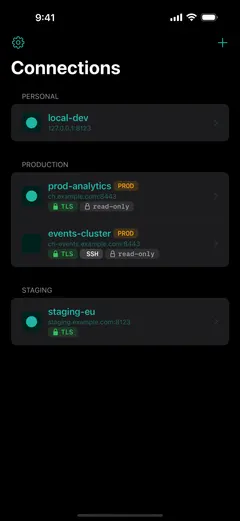
The tunnel goes device → your bastion → your server, and stops there. ProbeDeck does not proxy, relay, or mirror the traffic through any intermediary. There is no backend that sees your queries, your rows, your host names, or your credentials, because the developer never receives them in the first place. The SSH session is negotiated on the phone; the ClickHouse bytes are decrypted on the phone.
Pointing a pocket device at production raises one question: “who else can see this?” On this path nobody else does, and the convenience would not be worth much otherwise.
Authentication and host-key verification
You can authenticate to the bastion two ways: a password, or a private key. For key auth, ProbeDeck accepts OpenSSH-format Ed25519 or RSA keys, the modern default on most teams.
The secrets live in two places. Private keys are held in the Secure Enclave, the dedicated security coprocessor on the device; other credentials, the ClickHouse password and the bastion password if you use one, go in the iOS Keychain. There is no account, no cloud sync of secrets, and nothing leaves the phone.
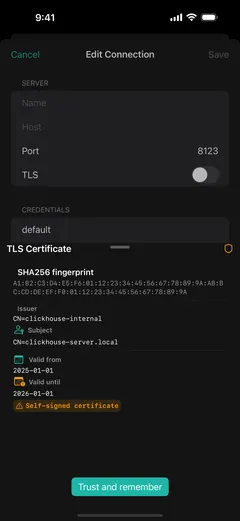
Before the first connection, ProbeDeck shows you the bastion’s host key fingerprint and asks you to confirm it. Do not skip this. Host-key verification is what stops a man-in-the-middle: if someone can sit between you and your bastion, they can impersonate it and capture whatever you send. The fingerprint lets you prove the box you reached is the box you meant to reach. Verify it out of band the first time: compare it against the fingerprint your infra team publishes, or run ssh-keyscan / ssh-keygen -lf against the host from a machine you trust. After that first confirmation, a changed fingerprint is a loud warning.
SSH is on the free tier, on purpose
Monitoring in ProbeDeck is free, and so is the SSH tunnel. That is a deliberate decision. The people this app is for sit behind a bastion, so locking SSH behind a paywall would stop them from opening read-only monitoring on their own cluster at all. The tunnel, the key handling, the host-key check, and the full read-only dashboard are free.
Because the connection rides over SSH from the device, it also works over cellular. You do not need to be on the office Wi-Fi or joined to a corporate VPN; during an incident you can reach prod from wherever you happen to be standing.
Details that trip people up the first time
A few practical things, learned the annoying way:
- Use the bastion user and port, not ClickHouse’s. The SSH fields want the jump host’s SSH username and SSH port (usually 22). The ClickHouse port (8123 or 8443) goes in the connection’s host/port fields; the tunnel forwards to that port, it does not connect on it.
- Keys must be OpenSSH format. If your key is in an older or converted format, re-export it as a standard OpenSSH private key. Ed25519 is the easy default; RSA works too.
- The forward target is the ClickHouse port. A common mistake is pointing the forward at 22 again. You are tunneling SSH to the bastion, then reaching ClickHouse on 8443/8123 across the internal network.
- Cellular adds latency per round-trip. ClickHouse over a tunnel on a mobile connection will feel a touch slower than on a wired desktop, because every request pays the round-trip twice: phone to bastion, bastion to database. That is normal, and monitoring queries are small enough that it stays usable.
What you get once you are connected
After the tunnel is up, ProbeDeck is a full ClickHouse monitoring client. You get the health dashboard for running queries, replication lag, disks, parts, mutations and merges, reading the same system.* tables you would query by hand, summarised into tiles graded healthy, warning, or critical. Watching all of that is read-only and free.
The operational side, killing a runaway query, running writes, the AI assistant, sits behind a one-time Pro unlock. It is $19.99 once, with no subscription, and it does not change how the tunnel or your credentials work: those stay exactly as described whether you unlock Pro or not.
ProbeDeck is the native iOS ClickHouse client used here: free monitoring over your own SSH bastion, with a one-time Pro unlock ($19.99) for operations like killing queries, writes, and the AI assistant. No subscription, and the tunnel never routes through anyone but you. See also monitoring ClickHouse from an iPhone.
Related: SSH tunnel to ClickHouse from iPhone · Monitor ClickHouse from your iPhone · What mobile ClickHouse monitoring looks like