If you run ClickHouse, you already have a database client you like. TablePlus is a common pick: clean, fast, multi-engine, and so are DBeaver and DataGrip. They connect to ClickHouse, run your SQL, and show you the rows. On the desktop, that is most of what you need.
The moment you reach for a phone, usually an incident, usually away from your laptop, is a different job than editing queries at your desk. Desktop clients win at the first job and leave you stuck on the second, which is the gap a ClickHouse-native iPhone tool like ProbeDeck fills. Both tools earn their place.
TablePlus and friends on the desktop
These are good tools. TablePlus, DBeaver, and DataGrip are mature desktop database IDEs, and on a large screen with a keyboard they are hard to beat:
- Multi-engine. One app for ClickHouse, Postgres, MySQL, and a dozen others. You learn one UI and use it everywhere.
- Rich SQL editing. Autocomplete, multiple result tabs, query history, saved snippets, formatting. When you are writing and iterating on queries, this is where you want to be.
- Schema tools. Browsing databases and tables, inspecting column types and codecs, comparing structures: the desk work of understanding a schema.
- Exports and data work. Dumping a result set to CSV or JSON, copying rows into a spreadsheet, ad-hoc analysis.
None of that is going away, and a phone app has no business trying to replace it. If you are building a materialized view or debugging a gnarly JOIN, you want the big screen.
The gap opens when you are on call, on a phone
Generic clients are built around one assumption: a database is a database, and the job is to run SQL against it. That holds right up until ClickHouse is misbehaving in a ClickHouse-specific way.
A generic client treats ClickHouse like any other SQL engine. It will let you type SELECT * FROM system.processes, but it does not know that table means “queries running right now,” it does not grade the result, and it does not tell you a replica has gone read-only or that a table is drowning in parts. The operational state that matters during a ClickHouse incident lives in a scattered set of system.* tables, and a generic tool leaves you to remember them, type them out, and interpret the raw rows yourself:
system.processes: the runaway query eating the cluster. You have to know to look, and know what a bad row looks like.system.replicas/system.replication_queue: replica lag and read-only replicas. A generic client shows none of it.system.parts: the “too many parts” condition, usually from inserting too often in small batches.system.mutations/system.merges: a stuckALTER … DELETEor a merge backlog holding a table hostage.
Now add the phone. Most desktop clients that offer a mobile build are the same dense, multi-pane UI shrunk onto six inches: panels you cannot tap, tables that scroll sideways forever, and a connection flow designed for a settings dialog. Even when the SQL works, the experience is built for a desk.
The trade a ClickHouse-native tool makes
ProbeDeck makes the opposite trade: a native iPhone monitoring and on-call client that understands ClickHouse operationally and is built for the moment the pager goes off.
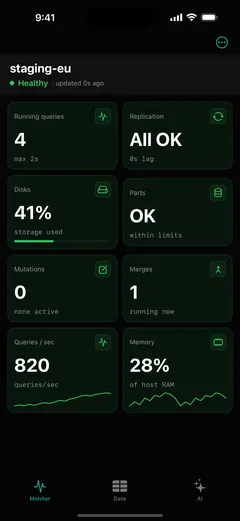
That shows up first on the monitoring dashboard. Instead of a blank SQL console, you get health tiles for running queries, replication, disks, parts, mutations and merges, QPS and memory, each graded healthy, warning, or critical. A red tile points you at the subsystem; the rest of the grid stays quiet. The app reads those scattered system.* tables and answers “is it okay?” before you compose a query.
From there the on-call features are the point:
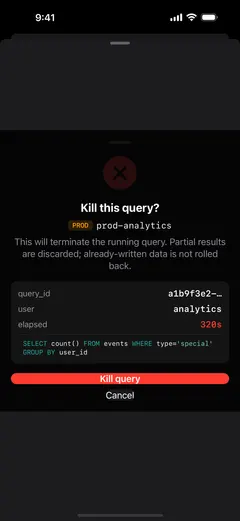
- Kill a runaway query with a type-to-confirm step and a production badge, so you can stop the bleeding without fumbling a
KILL QUERYby hand (Pro). - Replication health per table:
absolute_delay, queue size, and the read-only flag that usually means a Keeper problem, not a node problem. - Parts and merges views for the “too many parts” and stuck-merge cases, without you reciting the table names.
- SSH and TLS to reach a cluster behind a firewall or over its HTTPS interface.
- Credentials in the iOS Keychain. There is no account and no backend; hosts, passwords, and keys stay on the device, and nothing is proxied through the app developer.
ProbeDeck stops short of being a desktop SQL IDE. Read-only SQL and data browsing are there, and they are free, enough to poke at a table or sanity-check a number during an incident. Heavy schema work, big multi-tab query sessions, and exports belong on the desktop, in TablePlus or whatever you already use.
Use both: different tools for different moments
Carry both, for the moments each one is good at.
TablePlus (or DBeaver, or DataGrip) stays your desk tool: the place you write SQL, explore schemas, and do analysis on a real screen. ProbeDeck lives in your pocket for the stretch between an alert firing and you deciding what to do, when the laptop is across the room and every minute of a stuck query costs you.
If you already trust your desktop client, keep it and add something on the phone that tells you whether to get out of bed.
ProbeDeck is a native iOS ClickHouse monitoring and on-call client: free monitoring and read-only SQL, with a one-time Pro unlock ($19.99) for operations like killing queries, writes, and the AI assistant. No subscription.
Related: A native ClickHouse client for iOS · Monitor ClickHouse from your iPhone · A DataGrip alternative for ClickHouse on mobile