Your part count is climbing, inserts are slowing down, and system.merges shows a merge that has been running for forty minutes without moving. Search for this and you land in a pile of GitHub issues where the answer, eventually, is “we restarted the server and it went away.”
A restart clears it a good share of the time. It also throws away every clue about why. Five checks tell you which of the usual causes you have, and four of them are one query each.
If the symptom you have is the Too many parts error, start with what that signal means. The fix there lives on the write path, not in the merge queue.
1. Is it stuck, or is it big?
A merge of 400 GB of parts takes a long time. That is not a fault. Before anything else, establish whether progress moves.
SELECT
    database,
    table,
    result_part_name,
    round(progress, 4) AS progress,
    round(elapsed)     AS elapsed_s,
    num_parts,
    formatReadableSize(total_size_bytes_compressed) AS size,
    formatReadableSize(memory_usage)                AS mem,
    is_mutation
FROM system.merges
ORDER BY elapsed DESC;
Run it, wait a minute, run it again. Compare progress for the same result_part_name.
A number that climbs, even at 0.001 per minute, means the merge works. Read size and do the arithmetic: a 300 GB merge on a busy node takes hours.
A number frozen at the same value across several minutes is a stuck merge, and the next checks apply.
An empty result while parts pile up is a different problem. Nothing is merging at all, which points at check 2 or check 5.
Note is_mutation. Mutations run through the same machinery as merges, and a row with is_mutation = 1 is an ALTER ... UPDATE or DELETE rewriting parts. That matters for check 4.
2. Is every merge worker busy?
ClickHouse runs merges and mutations on one shared pool. When the pool is full, new merges queue behind the ones already running, and from the outside the table looks frozen.
SELECT
    metric,
    value
FROM system.metrics
WHERE metric IN (
    'BackgroundMergesAndMutationsPoolTask',
    'BackgroundMergesAndMutationsPoolSize'
);
Task equal to Size means saturation. Every worker is occupied, and whatever you were waiting on has not started yet.
Saturation tells you the pool is full. It says nothing about what filled it, and that is the question worth answering. One enormous merge can hold a slot for hours. A mutation rewriting a whole table does the same. So does a burst of tiny inserts that created thousands of parts and handed the pool more work than it can drain.
Raising background_pool_size buys time and costs CPU and disk IO. Do it after you know what filled the pool, not instead of finding out.
3. Is the disk full enough to block merges?
The disk is not out of space here. It is at 85 percent, everything else works, and that is exactly why this one hides.
A merge writes a new part before it drops the old ones, so it needs headroom for its own output. ClickHouse knows this and refuses to schedule a merge it cannot finish. The ceiling on merge size scales with free space, so as a disk fills, large merges stop being scheduled while small ones carry on. Parts accumulate in the middle range and nothing obvious appears in the log.
SELECT
    name,
    formatReadableSize(free_space)  AS free,
    formatReadableSize(total_space) AS total,
    round(100 * (1 - free_space / total_space), 1) AS used_pct
FROM system.disks;
Compare that free space against the size of what you want merged:
SELECT
    database,
    table,
    partition,
    count()                                  AS parts,
    formatReadableSize(sum(bytes_on_disk))   AS partition_size
FROM system.parts
WHERE active
GROUP BY database, table, partition
ORDER BY parts DESC
LIMIT 10;
If a partition holds more bytes than the disk has free, ClickHouse was never going to schedule the merge you are waiting for. Free some space and it starts on its own.
4. Is something else holding the queue?
Two places to look, depending on whether the table is replicated.
Mutations. They share the pool with merges, and a failing mutation retries forever.
SELECT
    database,
    table,
    mutation_id,
    command,
    create_time,
    parts_to_do,
    latest_fail_reason
FROM system.mutations
WHERE is_done = 0
ORDER BY create_time;
A latest_fail_reason that repeats is your answer. A mutation that cannot complete keeps taking pool slots that merges need. Killing it with KILL MUTATION frees the pool, and the same care applies as with killing a query: a cancelled mutation leaves the rows it already rewrote rewritten.
Replication queue. On a ReplicatedMergeTree table, the merge is a queue entry, and you can read straight from that entry why it will not run.
SELECT
    database,
    table,
    type,
    create_time,
    num_tries,
    num_postponed,
    postpone_reason,
    last_exception
FROM system.replication_queue
WHERE num_tries > 0 OR num_postponed > 0
ORDER BY num_tries DESC
LIMIT 20;
postpone_reason is the field worth reading in full. It says things like “not executing because it is covered by a part being merged” or “source part is not ready on any replica”. The second one is the nasty case: the merge waits for a source part that no replica has, and it will wait forever. That is where SYSTEM RESTART REPLICA and, as a last resort, SYSTEM RESTORE REPLICA come in, and the difference between those two commands decides how much of the table you rebuild. A queue that grows while replicas fall behind is the same picture as replica lag, read from the other end.
5. Did someone switch merges off?
SYSTEM STOP MERGES exists, and people run it during a bulk load or a migration to keep IO down. It is not persistent across a restart, and it is easy to forget.
You cannot read that state back from a system table on every version, which is why it hides for so long. The cheap test costs one statement:
SYSTEM START MERGES db.table;Then check system.merges again. If it fills up within a minute, you found it.
What not to reach for first
OPTIMIZE TABLE ... FINAL. It does not unstick anything. It queues more merge work into a pool that is already the problem, and on a large table it can take hours and pin your IO while it runs. If merges are stuck because the pool is full or the disk is tight, OPTIMIZE FINAL makes both worse.
Restarting the server. It clears in-memory state, so it does resolve a stopped-merges flag and does abort a wedged merge. It does not tell you which of the five you had, so the same merge wedges again next week. Two minutes of queries first buys you that answer.
Raising background_pool_size blind. More workers on a disk that is already the bottleneck moves the queue from one place to another.
Running these from a phone
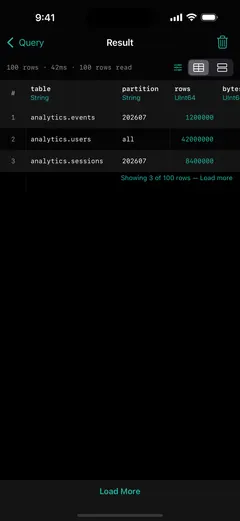
Every query here reads a system table and changes nothing, which makes them safe to run from anywhere, including a phone at the moment the alert wakes you.
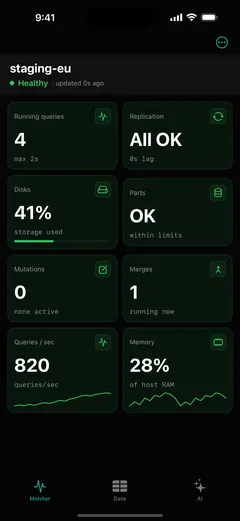
That is what ProbeDeck is for. Merges, parts, mutations and disk usage are tiles on the first screen, so check 1 through check 4 are one glance rather than four queries. Monitoring is free. You can also open the app and tap Explore demo data to see the whole thing against bundled sample data, with no server and no password.
The parts of this page that write, KILL MUTATION and SYSTEM START MERGES, sit behind a type-to-confirm step, because a mistyped statement at 2 a.m. costs more than a slow merge.
ClickHouse is a registered trademark of ClickHouse, Inc. ProbeDeck is not affiliated with, endorsed by, or sponsored by ClickHouse, Inc.